Your texts are memories.Don’t lose them.
Pair your phone & computer to search, clean up, and back up your text messages, photos, and videos.
Private. Secure. No servers, no tracking, end-to-end encrypted.

Private. Secure. No servers, no tracking, end-to-end encrypted.
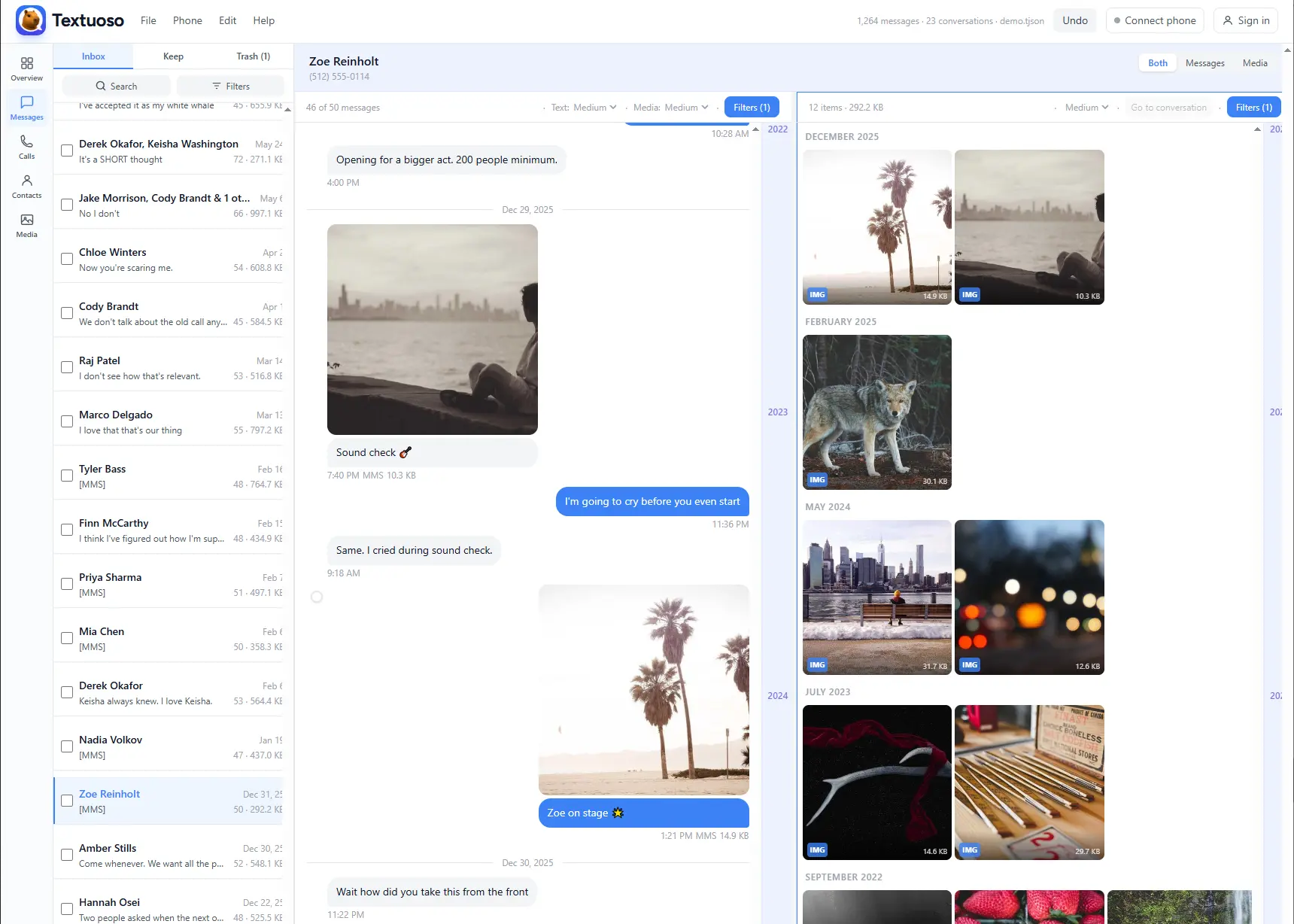
Browse & Search
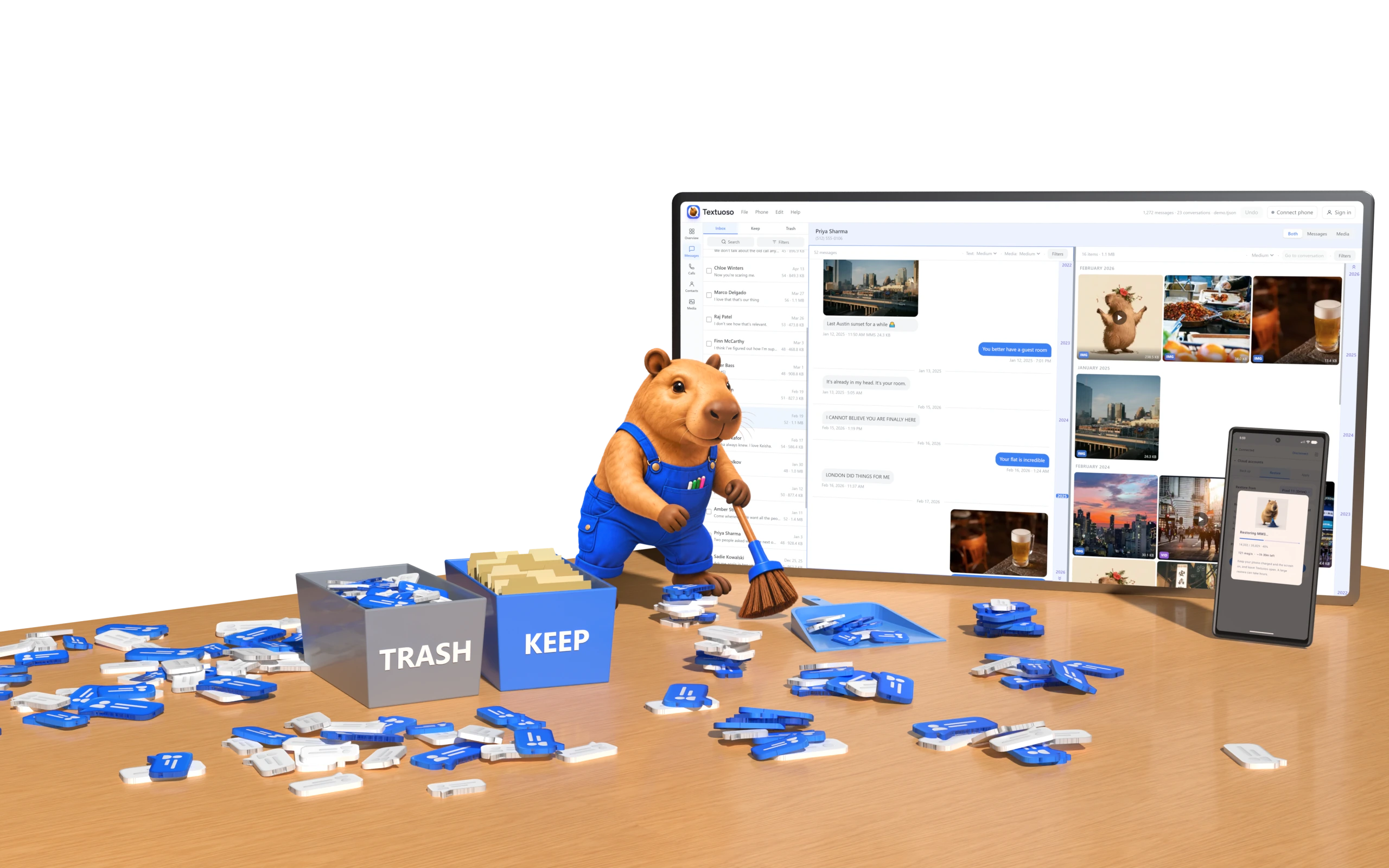
Browse messages on a large screen. Find old texts and media with powerful search filters.
Export & Save
Export conversations and save photos, videos, and attachments where you want them.
Clean Up Clutter
Bulk delete thousands of messages and media with the efficiency of a keyboard and mouse.
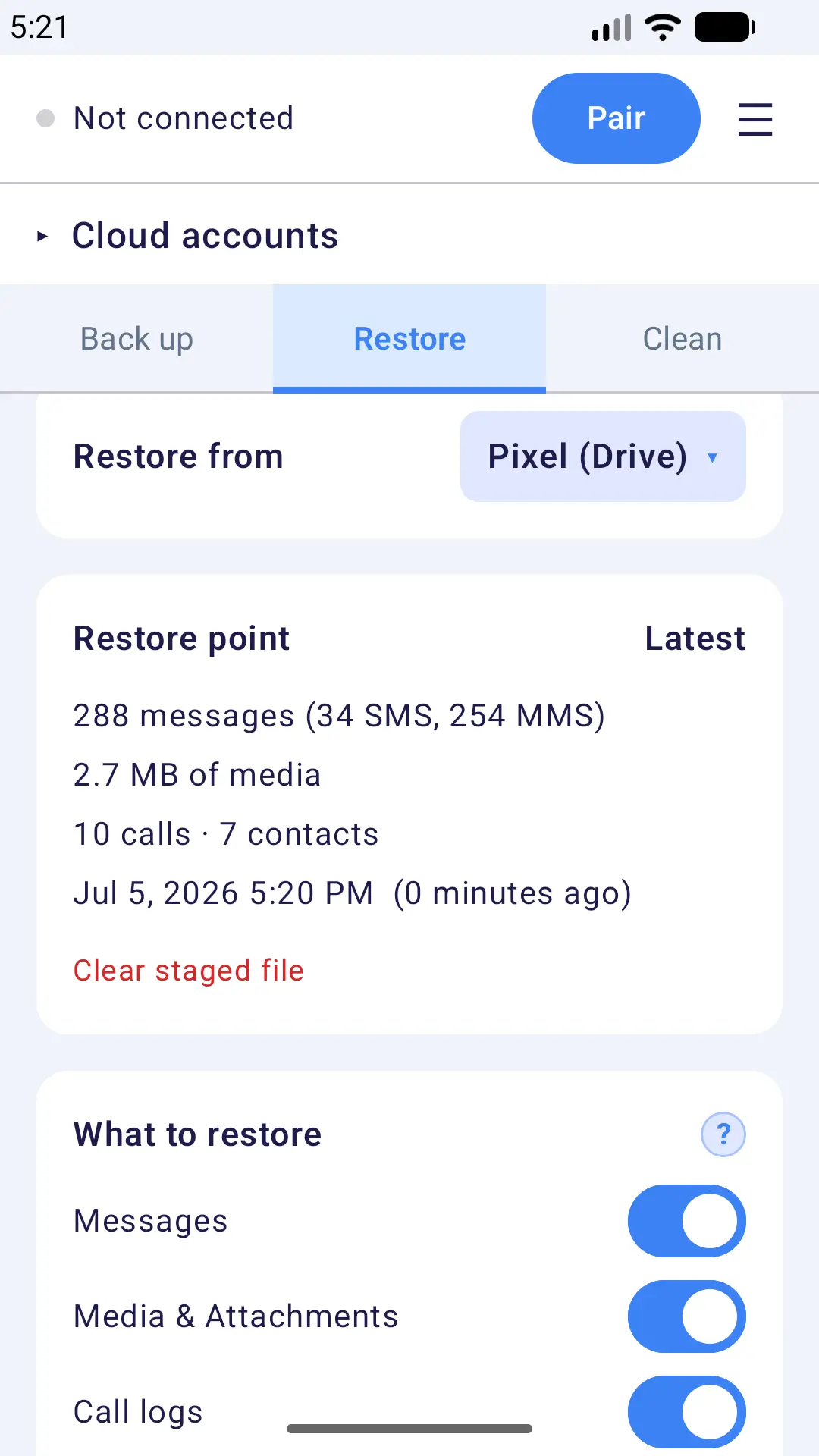
Backup & Restore
Securely back up your phone to your computer or the cloud, and restore to any Android.
Everything you can do
- Back up SMS, MMS, and RCS messages, media, call logs, and contacts
- Pair your phone and computer to use a bigger screen, keyboard & mouse for rapid cleanup and search
- Use end-to-end encrypted, peer-to-peer transfers — no server in the middle, no tracking
- Back up to your own computer, Google Drive, OneDrive, Dropbox, or multiple locations
- Encrypt your backups so nobody, including cloud providers, can read them
- Restore to any Android phone
- Migrate Samsung Messages history into Google Messages
- Back up Samsung Messages, including RCS chats and their attachments
- Import SMS Backup & Restore (.xml) backups directly
- Browse your entire history in a familiar, email-style layout
- Search everything and filter by contact, date, type, or attachments
- Bulk-delete messages, conversations, media, and contacts before you restore
- Strip large photo and video attachments to shrink a backup, while keeping the messages
- Export important media from your phone to any location
- Sort all media and attachments by size or date for rapid cleanup
- Analyze statistics across all your messaging
- Schedule automatic backups with fast, incremental updates
- Preserve massive histories: tested on hundreds of thousands of messages
- View, play, and save photos, videos, audio, and attachments from your messaging history
- Automatically flag duplicate messages and spam for removal
Not seeing what you need? Request a feature and tell us what you’re trying to do.
How it works
Connect your phone to your browser, then manage everything from one place.
Pair with a QR code
Scan the QR code in your browser to securely link your phone over your local network. Your data never leaves your devices.
Clean up & back up
Search and clean up messages, export media, and back up texts, attachments, call logs, and contacts.
Designed for privacy
Textuoso runs entirely in your desktop/laptop browser and talks to your phone over an encrypted peer-to-peer connection on your local network. No servers of ours in the middle, and your data is never seen by us or anyone else. Nothing leaves your devices unless you send it to a cloud provider yourself, and you can encrypt backups first so the provider can’t read them either.
Coming from Samsung Messages?
Samsung Messages has been retired. Textuoso reads it directly, including RCS chats and their attachments, so you can back up your history and migrate it to Google Messages.
Already use SMS Backup & Restore?
Open your existing SMS Backup & Restore .xml backups directly — no conversion needed. Clean them up, then export in the same format, fully compatible with SBR restore.
Frequently asked questions
Hit a bug? Report it here. Your browser and page are filled in for you.
Can I send and receive messages from Textuoso?
Not yet. Textuoso reads, cleans, backs up, and restores your message history, but it does not send. We are considering adding replies from your computer, sent as SMS and MMS through your own phone and your own number. If that is something you would use, send us a feature request and we will prioritize accordingly.
Does Textuoso support RCS messages and media?
Yes, but RCS support can vary by Android version, phone manufacturer, and carrier. Textuoso backs up RCS messages and their attachments, from both Google Messages and Samsung Messages RCS chats.
Can I back up Samsung Messages?
Samsung Messages has been retired, but Textuoso can read its data from the phone, so you can back up your Samsung Messages conversations, including RCS chats and their attachments, so you don't lose years of history. You can then restore them to any Android phone, so they show up in your current messaging app, like Google Messages.
How do I move Samsung Messages to Google Messages?
Back up your Samsung Messages history with Textuoso, then restore it to your phone or a new one. Restored messages appear in whatever your default app is — including Google Messages — as standard SMS and MMS.
Can I migrate from SMS Backup & Restore?
Yes. Textuoso opens SMS Backup & Restore (.xml) backup files directly. Bring your existing history in, view and clean it up, then restore to any Android phone. A free, seamless migration from SMS Backup & Restore.
How do I open a backup from my phone in the web app?
A backup made by the phone app lives on the phone or in your cloud storage, so you transfer one restore point at a time. On the phone, open the Restore tab, pick the backup and the restore point you want, and tap Prepare restore if it is not prepared already. Then, in the web app, connect the phone and choose Transfer staged restore point from the Phone menu. That copies that restore point to your computer, where it opens like any other backup file: browse it, search it, clean it up, and export it.
Will it work with my messaging app?
Textuoso reads the SMS and MMS databases Android keeps for the whole system, which is where standard messaging apps store your history, and on Samsung phones it also reads Samsung’s own message store directly.
- Standard messaging apps. Google Messages, Samsung Messages, and the many other apps built on Android’s messaging system all store their messages where Textuoso can read them, so it does not matter which one you use.
- Samsung Messages, including its RCS chats. Samsung keeps those in its own store rather than the standard one. Textuoso reads it directly, which matters now that Samsung Messages is retired.
- Signal, WhatsApp, Telegram, Facebook Messenger and similar are not supported. They keep conversations in their own private, encrypted databases that no third-party app can read. Those messages are not in the Android databases, so Textuoso cannot back them up. Use each app’s own export or backup feature instead.
- RCS depends on your phone. Support varies by manufacturer, Android version and carrier. It is easy to check: load directly from your phone and see whether your RCS messages and their media are included.
Is Textuoso free?
Yes. The phone app is free. The web app is free to use too, but requires an account after a free trial, and each account gets two free phone registrations.
Why do web accounts not have passwords?
Passwords are sensitive information. Textuoso's privacy-first design aims to avoid storing ANY sensitive information, and instead uses one-time codes. Your browser will preserve your login for 60 days in most cases, making passwords largely unnecessary for an app that isn't intended for daily use. A sign-in code expires 10 minutes after it is sent. Signing out invalidates your session on the server, not just in your browser, because the session is a cookie the page itself cannot read.
Is my data safe?
The Textuoso web app runs everything in your browser, and your phone connects directly over an encrypted peer-to-peer link. Your messages, media, calls, and contacts are never sent to us or anyone else, unless you choose to use a cloud provider. An account only registers which phones you have paired; it never holds your data. Backups can also be encrypted on your phone, so even a cloud provider cannot read them.
Do I need a computer?
No, Textuoso provides standalone backup and restore functionality on your phone. A desktop or laptop just gives you a roomier interface, and more convenient controls for big cleanups.
How large a backup can it handle?
It has been tested on histories of over 200k messages. The only known issue with large backups is that restore times can take hours, which is a fundamental limitation of Android telephony databases, not Textuoso.
Does Textuoso support cloud backups?
Yes, the phone app supports backups to Google Drive, Microsoft OneDrive, and Dropbox. You can also backup through the web app to any location you want.
Can you schedule backups?
Yes, using the phone app, you can schedule backups at any period of time to any cloud provider, or locally on your phone.
Does Textuoso support incremental backup?
Yes, the phone app by default uses incremental backups, so you can schedule frequent backups without wasting disk space on each one being a full backup.
Does Textuoso support multiple snapshots of the phone at different times?
Yes, you can preserve a backup from one point in time separately from future backups, and this can be configured to run automatically at specified periods.
What format are backups in, and can I open them elsewhere?
Backups use Textuoso's own format, built for very large histories with media stored inline. You can also export to the SMS Backup & Restore XML format, which that app can restore itself, so your history is never locked to one tool.
Does Textuoso encrypt the backup files?
Yes. Backups can be encrypted on your phone before they are written, so the backup is unreadable without your key, even when stored with a cloud provider. Transfers between your phone and computer are encrypted separately, over the peer-to-peer link.
Why isn't my video playing in the web app?
Nothing is wrong with the video or your backup. Phones record in codecs that suit a phone, HEVC most often, and browsers vary widely in what they can decode. In our testing Safari supports the most formats and some browsers support almost none. Save or export the video and open it in a separate video player, which is far more likely to handle the codec.
What browser do you recommend?
Any modern browser runs Textuoso. Two things differ. If you want to watch videos from your history in the browser, Safari decodes the most mobile video formats. Also, on a computer, Chrome and Edge let you choose where a save or export goes, whereas most others send it straight to Downloads.
What browsers are supported?
Textuoso is tested in Chrome (normal and Incognito), Edge, Safari, and Firefox. Firefox private windows do not work, for the reason below. Opera, Brave, Vivaldi and other browsers have not been tested yet. If you hit a bug in a specific browser, please tell us which one.
Why doesn't the web app work in Firefox's private mode?
Backups are far too large to hold in memory, so Textuoso stages them in storage the browser keeps private to this site (the Origin Private File System). Firefox blocks that storage in private windows, so there is nowhere to put the backup and it cannot be opened. A normal Firefox window works, as does Chrome's Incognito, which does allow it.
Why isn't the pairing working?
The most common cause is a VPN on one of the two devices. A VPN routes that device somewhere else, so the phone and the computer end up on different networks and can no longer find each other. Both on the same VPN is fine, and both off is fine; it is the mismatch that breaks pairing. Textuoso will not work around it by relaying your messages through a server in the middle, which is the point: your history goes straight from one of your devices to the other. This one is easy to miss, because a VPN often connects on its own and has nothing obviously to do with Textuoso.
Next, both devices have to be on the same network. That is deliberate, for the same reason: the connection is made directly between your phone and your computer, so your messages are never relayed through a server. Check they are on the same Wi-Fi, and that it is not a guest or public network, since those usually stop devices on them from seeing each other.
Finally, on Android 17 and newer, Textuoso needs permission to reach devices on your local network. It is a separate permission from internet access, so an app can have full network access and still be blocked. Check Settings, then Apps, then Textuoso, then Permissions, and allow the local network entry. Older versions of Android do not have this permission and do not need it.
Do I have to make Textuoso my default SMS app?
Only to restore or apply changes, and only for as long as that takes. Android lets nothing but the default SMS app add, change or delete messages on the phone, so there is no way around it. Switch back to your usual app as soon as it finishes. Backing up and cleaning up never need it, and Textuoso does not send messages or intercept incoming ones.
Will restoring create duplicates?
No. A restore merges into what is already on the phone and skips anything that is already there, so restoring the same backup twice does not double your messages. You can also choose to replace what is on the phone instead of merging.
Does Textuoso change or delete anything on my phone?
Not unless you tell it to. Browsing, searching and backing up only read. Nothing is deleted until you select messages or media and apply the change, or until you choose a restore that replaces what is on the phone instead of merging into it.
Why didn't my scheduled backup run?
First, make sure the phone app is on version 1.0.3 or newer. Earlier versions could delay a scheduled backup by hours, or skip it without saying so. From 1.0.3 on, a run that does not happen tells you why: it is shown in the app, and listed in the Scheduling report (open the menu, choose Help, then Scheduling report). If nothing explains a missed night, one of these is usually the reason:
- A condition you set was not met. Under the Back up tab, the Advanced panel lists what a scheduled run requires: Wi-Fi, an unmetered connection, or charging for consolidation. If one of those was not true at the scheduled time, the run is skipped and says so, and it tries again at the next occurrence.
- The battery was below 20% and the phone was not charging. This one has no switch and always applies, so a long backup is not cut short by the battery running out. Plugged in, it runs at any level.
- A permission it needs was turned off. If a category is switched on but its permission has been revoked, the run stops rather than quietly saving without that data. It records a failed run and notifies you, so keep notifications allowed.
- The alarm permission was taken away. Android calls it alarms and reminders, and the schedule cannot be armed without it. The app shows the schedule as not working when this happens.
- Textuoso was force stopped. Force stopping from Android settings cancels its alarms outright. They are re-armed the next time you open the app.
- The schedule is on your old phone. A schedule belongs to the phone that created it, so enable it again on this one.
Why did my scheduled backup run later than requested?
On version 1.0.3 and newer it should start within seconds of the time you picked. Earlier versions left the timing to Android, which was free to postpone it by hours to save battery. That is why it no longer works that way.
One delay remains by design. Only one operation touches your messages at a time, so a scheduled run waits behind a restore, a load, or an export already in progress rather than competing with it.
A run that is skipped rather than delayed, because a condition was not met, waits for the next occurrence rather than retrying straight away. To see what was due, what ran, and how late, open the menu, choose Help, then Scheduling report.
Why is my restore taking so long?
Textuoso, and every other backup and restore app, is limited by how fast Android will accept insertions into its telephony database. MMS is the bottleneck: each one is several rows rather than one, and the database gets slower to insert into as it grows. Without root access that is unavoidable. SMS restores quickly by comparison. For a large backup, run it overnight.
The lever that actually works is restoring less. Your phone does not have to hold everything you own: a backup is a complete, permanent copy in its own right, and you can open it in the web app whenever you want to read or search it. Nothing is lost by leaving old years out of the phone.
So keep the full history as a backup, then make a cleaned-up version to restore. Drop the conversations you do not need on the phone, or keep every conversation and strip the attachments that make them slow. The web app is built for exactly this: open the media view, sort by size or date, and delete thousands of memes and screenshots in a few clicks. The phone gets a restore that finishes in a manageable time, and the full history stays intact where you can still get at it.
Does it support iPhone?
Not yet. Apple blocks third-party access to messaging by design, so there is no way to pair an iPhone directly. There is an indirect route through macOS that we are exploring.